If you manage several apartments in the same building, you've probably wondered: can I sell them as one big booking, while still keeping each apartment listed separately?
The answer is yes, but Airbnb's built-in tools only get you part of the way there. Here's exactly how we set it up for our own building, where four apartments can be booked individually, in pairs, or as the whole floor.
The setup we wanted
The setup we wanted
We have:
- 4 individual apartment listings (Apartment 1, 2, 3, 4)
- 2 "pair" listings (Apartment 1+2, and Apartment 3+4)
- 1 "whole building" listing (all 4 apartments together)
The goal: no matter which listing gets booked, all the other listings covering those same apartments should automatically block those dates. Otherwise, you risk a guest booking "Apartment 2" on its own listing, while someone else books the "whole building" for overlapping dates.
What Airbnb's native tool actually supports
Airbnb has a built-in feature for this, found under Calendar → Availability → Connect calendars → Connect multiple Airbnb listings. It lets you choose a "main" listing and link several "child" listings underneath it — so booking the main listing blocks the children automatically, and vice versa.
The catch: it only supports one level. A listing can be a main listing, or a linked child — not both at the same time. So we could easily link:
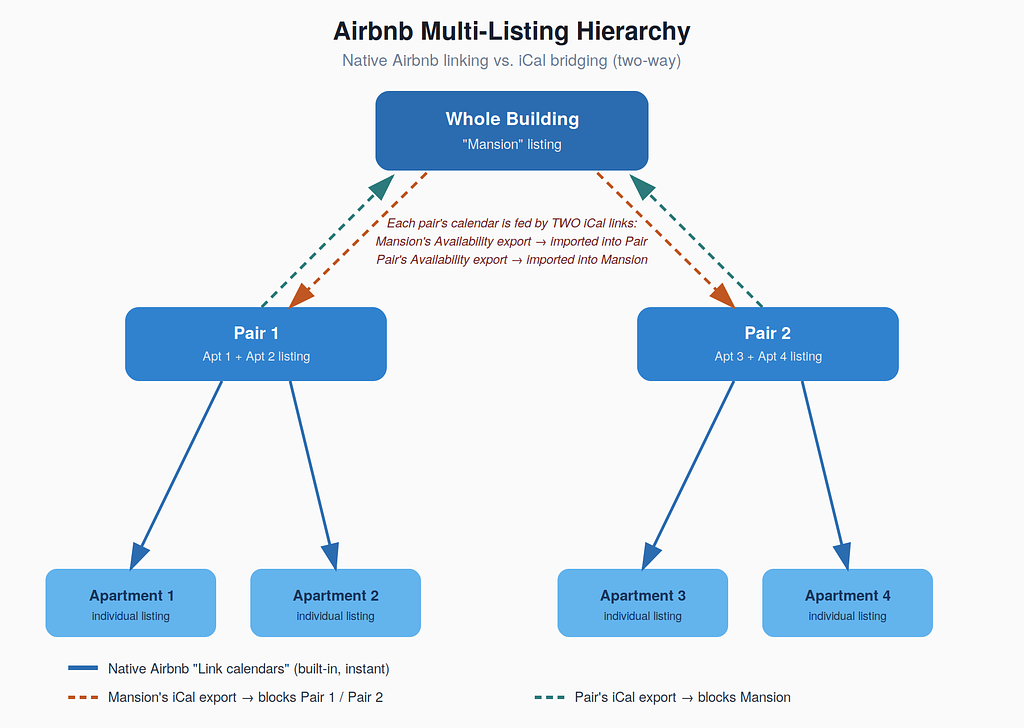
- Pair A (main) → Apartment 1, Apartment 2 (children)
- Pair B (main) → Apartment 3, Apartment 4 (children)
But we could not then also make Pair A and Pair B children of the whole-building listing — Airbnb's tool doesn't support a three-level hierarchy like that.
Bridging the gap with iCal
For the connection Airbnb's native tool won't do — Whole Building ↔ Pair A and Whole Building ↔ Pair B — we used iCal syncing instead:
- On the Whole Building listing, export its iCal calendar link
- Import that link into Pair A and Pair B's calendars (so a whole-building booking blocks both pairs)
- Export Pair A's and Pair B's iCal links
- Import both into the Whole Building listing's calendar (so a booking on either pair blocks the whole building)
This gives you the effect of a three-level hierarchy, even though Airbnb doesn't officially support it — you're just doing the top connection manually via iCal instead of the native tool.
The one thing to know about iCal syncing
Native Airbnb linking updates instantly. iCal syncing does not, it typically refreshes every few hours, not in real time. That means there's a small window where a booking could, in theory, slip through before the block propagates everywhere.
Our fix: we switched the Whole Building listing from Instant Book to Request to Book. That gives us up to 24 hours to manually double-check all the calendars before approving, a simple manual safety net that closes the gap iCal sync leaves open.
If you're managing a similar setup, this hybrid approach, native linking where Airbnb allows it, iCal bridging where it doesn't, plus Request to Book as a manual backstop, is the most reliable way to avoid double bookings without needing to build anything custom.